10 Offline-First App Strategies for Custom Software Development in AgriTech Field Systems
For AgriTech teams, offline-first apps don’t start with sync engines or database choices. They start with a blunt operational question: what absolutely must still work when the signal drops in the field?
This article is for Heads of Technology and product or operations leaders responsible for offline-capable field apps and supply-chain traceability systems. It maps ten strategies that separate apps which merely survive offline from those that produce dependable, audit-ready operational data. (For the broader engineering view, see our companion piece on building offline-first applications, and for the regulatory backdrop, EUDR compliance technology.)
1. Define the field workflow that must work without connectivity
In remote farms, plantations, collection points, and transport handoffs, the offline-critical core usually means field data capture, geotagged observations, lot assignment, inspection evidence, operator sign-off, and local validation. Google’s Android guidance is clear on the principle: an offline-first app should be able to perform all, or at least a critical subset, of its core business functions without internet access — and the most reliable place to define that behaviour is the data layer.
Many teams still treat offline mode as a fallback state. Field systems need the opposite mental model. If agronomists, auditors, drivers, or local coordinators work in low-bandwidth regions across Australia, India, or rural supply networks serving Europe, the “normal” condition may be intermittent connectivity, not continuous access. An offline-first design accepts that reality and maps the exact steps that must continue locally: create records, edit records, attach evidence, validate required fields, and queue events for later sync. If those actions depend on a live API call, the app isn’t really field-ready.
This is where custom software development creates leverage. Instead of forcing field operations into a generic mobile shell, you can shape the product around actual field constraints: delayed connectivity, shared devices, battery pressure, environmental exposure, and compliance-driven evidence capture. At Brainstack, that work is framed as delivery-focused engineering, not a slide-deck exercise. The useful starting point is usually a consultation or technical architecture review that identifies which workflows are mission-critical offline and which can stay online-only without putting operations or compliance at risk.
2. Make the device database the source of truth
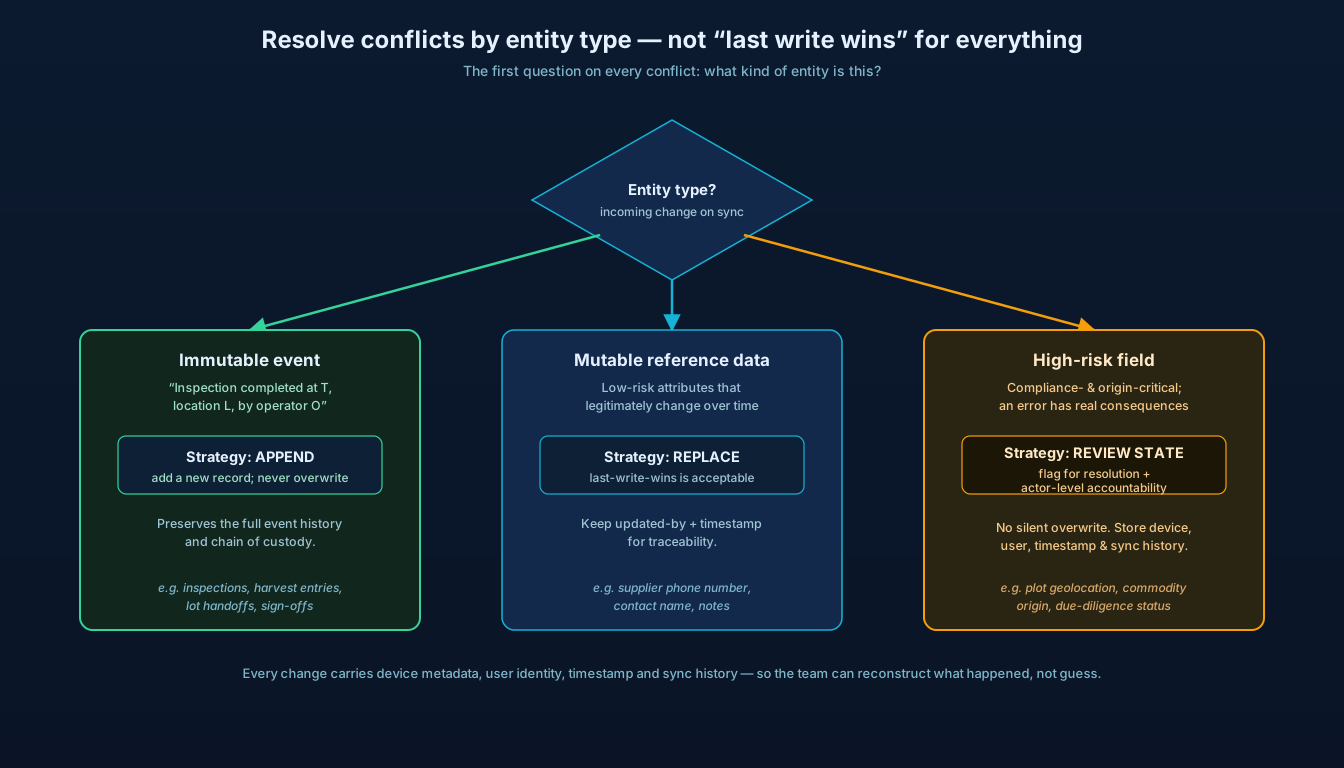
If your mobile app reads directly from the network whenever a user opens a screen, the experience will always feel brittle. Official Android architecture guidance recommends a local data source, such as a device database, as the source of truth for offline support. The app should read from local storage first, expose observable state from that local store, and then refresh from the network when conditions allow. That pattern lets screens load immediately and keeps the UI stable even when connectivity is weak or disappears mid-task.
Once the device database becomes the operational centre of the app, you can structure repositories, validation logic, and local business rules around persisted state instead of transient API responses. A scout can open a farm profile, inspect historical visits, record disease observations, capture photos, and save input recommendations against local entities without waiting for a remote round trip. The cloud still matters, but it becomes a synchronisation partner rather than the app’s moment-to-moment dependency.
There’s also a practical gain for supply-chain traceability. When the local store mirrors the domain properly — plots, farmers, suppliers, collection lots, transport events, inspections, and due-diligence evidence — you reduce the risk of fragmented records and failed submissions later. Teams often invest in APIs and dashboards while the field app quietly becomes the weakest link. Treat the local schema as a serious product artifact, designed with the same care as your cloud data model and event pipelines.
3. Model sync as a queue, not a background afterthought
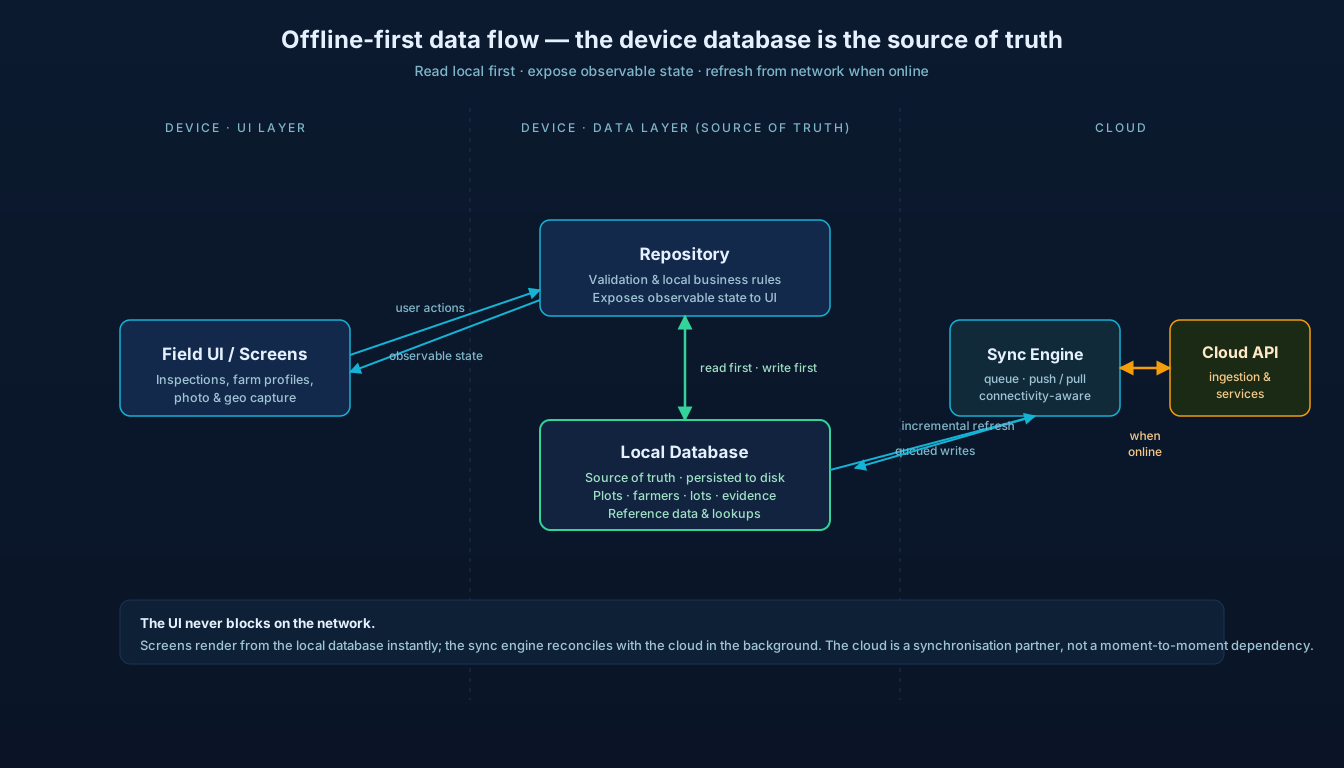
Users assume “saved” means safe; engineers sometimes mean “saved locally and maybe uploaded later.” Those are not the same thing. Official guidance from both Android and Microsoft points toward queue-based thinking: writes can be stored locally, deferred, retried, and synchronised when connectivity returns, while reads use incremental refresh or configurable down-sync intervals. That’s much closer to what real field systems need than a vague “auto-sync in background” promise.
Every meaningful action — new inspection, geolocation update, lot handoff, photo attachment, farmer registration edit — becomes a durable unit of work with a state such as pending, syncing, synced, retrying, or failed. You can then apply rules around ordering, idempotency, dependency chains, and backoff. If a field officer creates a farm visit and adds evidence before a network is available, the system can preserve the relationship between those records and replay them in the right order. If an upload fails on a temporary timeout, the queue retries. If it fails because a server-side rule changed, the app can surface a specific exception instead of leaving the user in the dark.
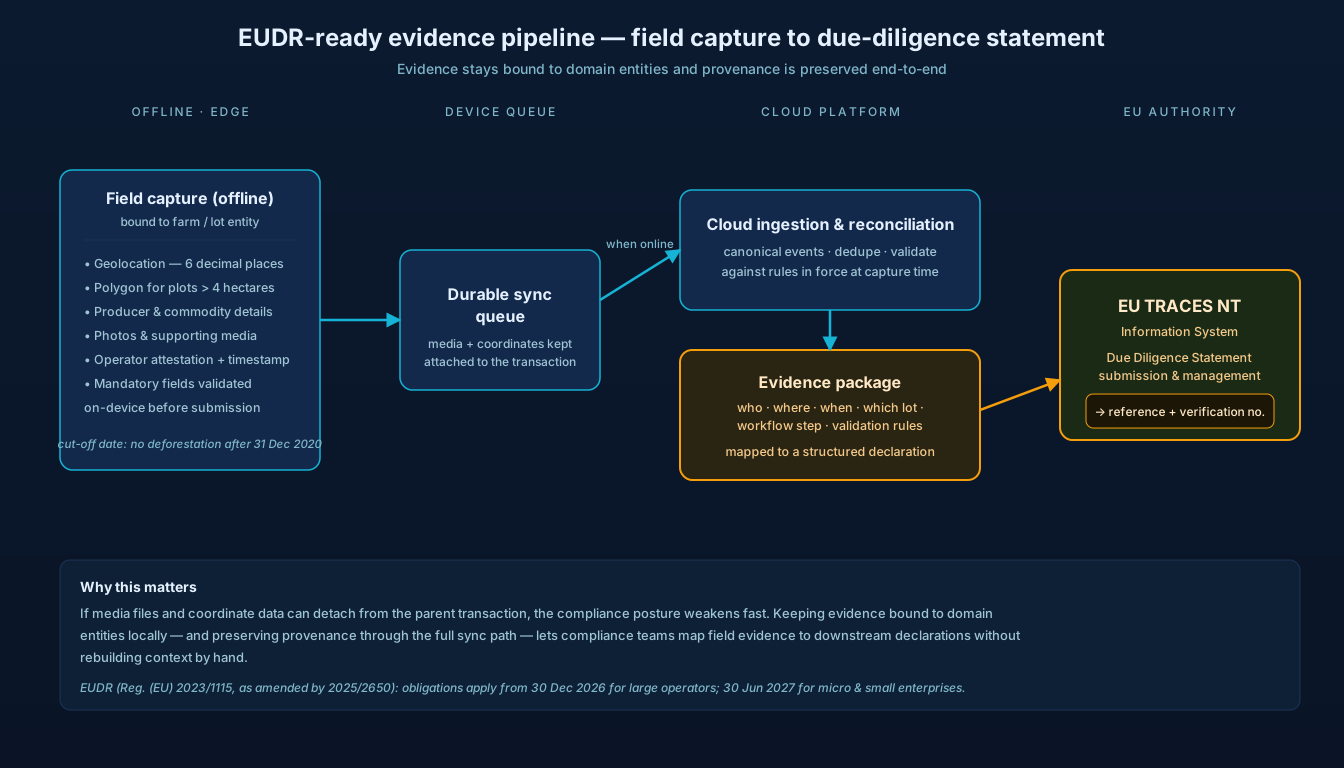
That structure also helps with microservices and data pipelines. Rather than syncing raw mobile transactions straight into every downstream system, you can land canonical events in a cloud ingestion service, reconcile them, and then distribute them to traceability services, analytics stores, and compliance workflows. The mobile queue protects the edge; the cloud pipeline protects the platform.
4. Design conflict resolution around agronomic events and operator accountability
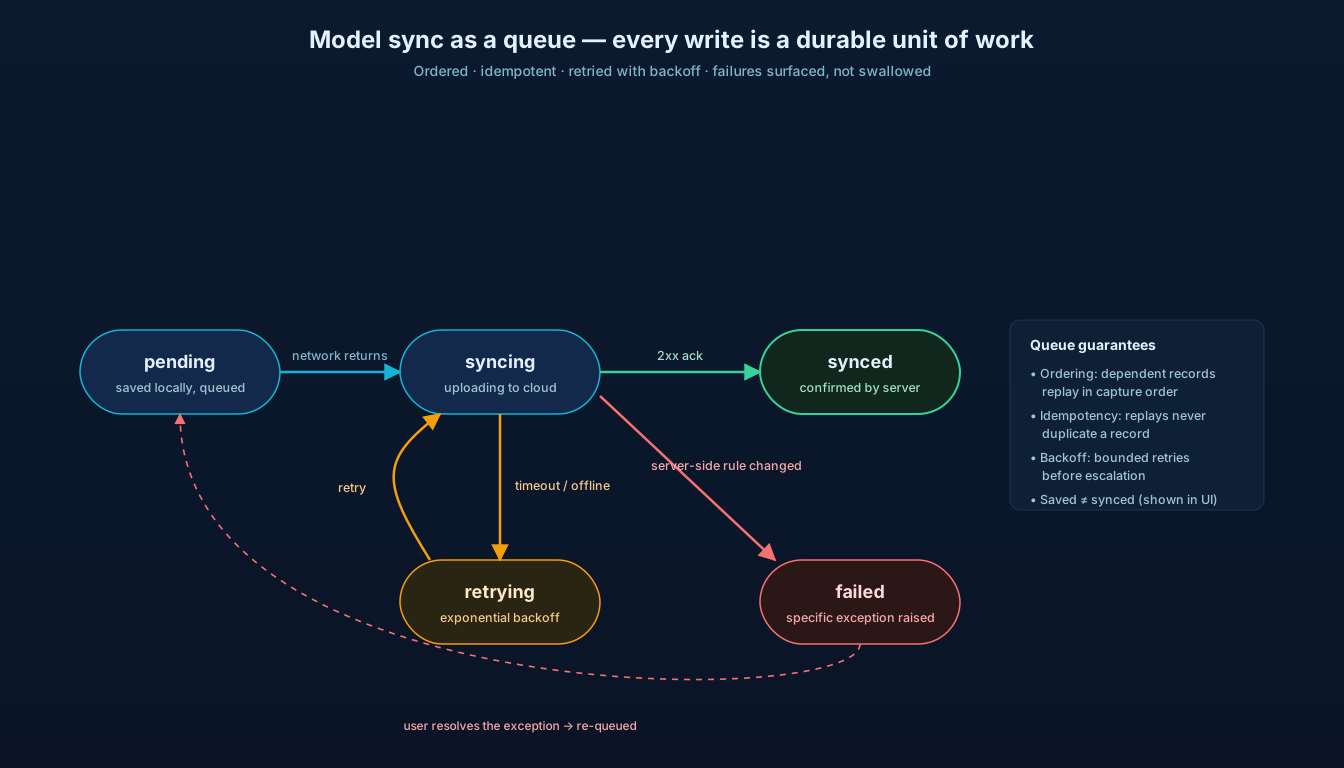
Conflict resolution sounds technical, but the real issue is operational truth. What happens when two devices update the same plot boundary? Or when one supervisor corrects a harvest entry after another operator has already assigned the lot? Android’s offline-first guidance calls out synchronisation and conflict resolution as central design concerns, especially for lazy-write systems that persist locally first and sync later. Ignore it, and you’ll eventually end up with silent overwrites or data drift that nobody spots until reporting breaks.
The fix is not just “last write wins.” That’s sometimes acceptable for low-risk profile edits, but it’s dangerous for agronomic events, compliance evidence, and chain-of-custody records. The better question is: what kind of entity is this? Immutable events — like “inspection completed at this timestamp and this location by this operator” — should usually be appended, not overwritten. Mutable reference data, like a supplier phone number, may allow replacement. High-risk fields, such as plot geolocation, commodity origin, or due-diligence status, often need explicit review states and actor-level accountability.
If each change stores device metadata, user identity, timestamps, and sync history, your engineering team can reconstruct what happened instead of guessing — especially valuable for operations leaders dealing with remote teams and outsourced field agents. As an engineering partner, this is the level that matters: not generic “sync support,” but domain-aware conflict handling that matches how agricultural work and compliance evidence actually move through the system.
5. Capture geolocation, timestamps, and evidence for EUDR traceability
For AgriTech products serving EU-linked supply chains, offline capture isn’t only about usability — it’s tied directly to compliance. The EU Deforestation Regulation (Regulation (EU) 2023/1115) requires due diligence for covered commodities and products, including traceability back to the plot of land where production occurred, with geolocation information as part of the evidence chain. The regulation also sets a cut-off date of 31 December 2020 for deforestation-related eligibility. Note the timeline: the regulation has been in force since 2023, but its obligations apply from 30 December 2026 for large operators and traders, and 30 June 2027 for micro and small enterprises (per the December 2025 amendment, Regulation (EU) 2025/2650) — so systems being built now should be ready ahead of those dates.
That means your offline-first app has to treat geolocation, timestamps, attachments, and operator attestations as first-class data, not optional extras. A field worker may need to capture polygon points, parcel references, farm boundaries, producer identity, commodity details, and supporting photos while entirely offline. Geolocation is captured as coordinates to six decimal places — a single point for smaller plots, and a polygon for plots above four hectares. If those records are stored loosely, or if media files and coordinate data can become detached from the parent transaction, your compliance posture weakens fast. Better design keeps evidence bound to domain entities locally, validates mandatory fields before submission, and preserves provenance through the full sync path into your central traceability system.
If you’re building supply-chain traceability systems with EUDR support, think in terms of evidence packages: who captured the data, where, when, against which farm or lot, under what workflow step, and with which validation rules in force at the time. The EU’s information system — TRACES NT — supports due diligence statement submission and management, so your mobile and cloud architecture should be able to map field evidence to structured downstream declarations rather than forcing compliance teams to rebuild context manually later.
6. Package maps, reference data, and lookup rules for low-bandwidth environments
A surprising number of field apps technically support offline entry but still fail in practice because the surrounding context is missing. Users can’t search suppliers. Maps don’t load. Crop or commodity classifications disappear. Validation rules depend on live services. That creates a fake offline experience. Android’s guidance emphasises immediate access to local data and fetch behaviour that respects battery and network conditions — which implies careful packaging of the supporting datasets the user will need before they lose connectivity. In AgriTech, that usually means pre-positioning the right offline data bundle on the device:
- Map tiles for the active regions and territories the user is assigned to
- Producer and plot reference data for those assigned territories
- Lookup tables for crops, commodities, and grades
- Local language labels for the field workforce
- On-device validation and business rules — including compact, machine-readable policy logic that determines whether certain evidence is mandatory for a given commodity flow
None of that is glamorous, but it’s what turns an offline-first app into a usable field tool instead of a glorified form. For product and operations leaders, this is also a capacity issue: packaging the right datasets means coordinating mobile engineering, backend services, and data pipeline ownership. That’s why custom software development is often the better fit than stitching together generic tooling — the mobile edge, cloud sync contracts, and reference-data lifecycle have to work as one system.
7. Show sync state, freshness, and failure recovery in the field experience
If users don’t know whether data is current, they’ll invent their own logic. They’ll take screenshots. They’ll keep paper notes. They’ll re-enter the same visit twice. Microsoft’s offline documentation explicitly highlights status indicators such as pending sync, initial sync behaviour, incremental updates, and a visible offline sync state. That’s not a cosmetic feature. It’s operational risk management.
A field app should tell the truth plainly. Has this record been saved locally only? When was this screen last refreshed from the server? Are there five pending uploads or fifty? Did a photo fail because of storage limits, or because the network never returned? Good UX surfaces freshness, queue size, last successful sync time, and actionable recovery steps at the point of work — not buried behind settings pages.
There’s a second benefit: trust. Field adoption often rises or falls on whether the app feels honest. When sync status is visible and understandable, users stop guessing — they know whether to keep working, retry, or escalate. In systems that support traceability and compliance, that clarity prevents missing evidence and duplicate submissions long before the issue reaches the data team.
8. Protect offline data with role-based access, encryption, and secure storage
Offline-first apps store valuable data on the device by design. That improves resilience, but it also increases the attack surface. If the app handles farmer identities, plot coordinates, sourcing records, or due-diligence evidence, local storage needs the same seriousness you’d bring to cloud security.
The baseline should include encrypted local storage, strong authentication, role-based access to sensitive functions, secure handling of media attachments, and remote session controls for lost or shared devices. Not every user should see every parcel, supplier, or compliance record just because the app is offline. Local datasets should be scoped to territory, assignment, or role wherever possible, which also reduces storage pressure and speeds up sync.
There’s a compliance angle, too. EUDR workflows involve identifiable operators, supply chain data, and geolocation evidence. You need a design that protects confidential information while still preserving traceability and auditability — easier to achieve when offline storage, sync permissions, and cloud access policies are designed together rather than patched in after rollout.
9. Instrument offline-first apps with telemetry that explains gaps, drift, and retries
You can’t improve what you can’t see. The most damaging offline failures are often invisible at first: a queue that never drains for one region, a device cohort stuck on stale reference data, attachment uploads timing out after an app update, or local validation rules diverging from server rules. Queue states and sync mechanics already exist in the architecture, so instrument them deliberately and push that telemetry into your cloud monitoring stack.
What should you watch? Retry rates, queue age, sync lag, local database growth, attachment failure ratios, stale-cache incidence, and conflict frequency are a good start. Add segmentation by geography, app version, device class, and workflow type, and you’ll quickly see whether problems come from field conditions, product design, or backend bottlenecks. It turns complaints like “the app loses data” into concrete signals such as “image uploads over 8 MB on version 4.3 are retrying for more than 24 hours in two districts.”
Mobile telemetry shouldn’t live in a silo. Feed it into the same analytical environment that tracks operational throughput and compliance completion, and you can connect system behaviour to business outcomes. Are missed traceability records tied to offline drift? Are certain workflows generating more unresolved conflicts? That’s the kind of engineering visibility a delivery-focused partner should help establish from the start.
10. Use custom software development to align mobile apps, cloud services, and compliance
Eventually, every serious AgriTech platform hits the same wall: the mobile app, backend services, reporting stack, and compliance workflows were designed separately, so offline behaviour becomes a patchwork. One team owns forms, another owns APIs, a third owns dashboards, and nobody owns the end-to-end state model. The challenge isn’t building “an app.” It’s aligning edge capture, sync orchestration, cloud microservices, and downstream evidence pipelines into a coherent operating model.
The practical goal is straightforward. Define the offline-critical workflows. Make the device database authoritative for field execution. Treat sync as a managed queue. Build conflict rules around domain truth. Preserve geolocation and evidence for EUDR-ready traceability. Package the supporting context users need in low-bandwidth environments. Show sync state honestly. Secure the edge. Instrument everything. Those are the moves that make offline-first apps dependable, not just demo-friendly.
Building offline-first apps for AgriTech?
We’ll review your current mobile flows, local data model, sync contracts, cloud services, and compliance handoffs as one system — and show you where data-loss risk really sits and where EUDR evidence capture is too loose. No generic discovery deck.
Newest Post


Build Offline-First Apps


Technologies
 React
React Node.js
 Python
 PostgreSQL
 Odoo
Odoo Docker
 Kubernetes
 TypeScript
 MongoDB